

EK12 + BOLD IMPROVEMENT PORTAL SECURITY POLICY
The Bold Improvement Portal provides educators with early success and warning insights through robust and reliable predictive analytics to identify patterns, proactively address student needs, and measure their strategies' real-time impact.

Security Policy
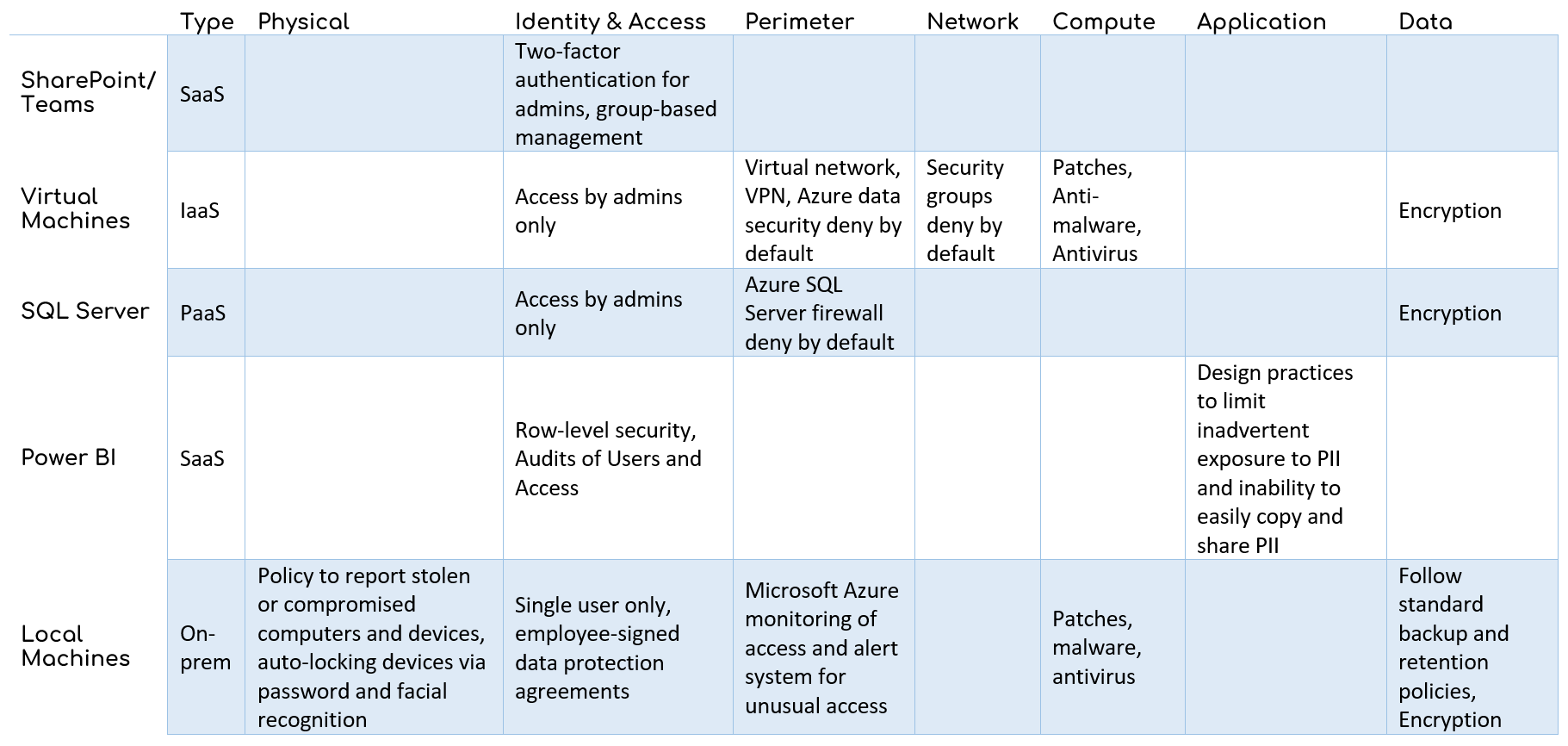
EmpowerK12 has developed data security expertise by successfully analyzing and keeping secure the data from over 95 schools in the District of Columbia over the last 5 years. We utilize a defense-in-depth approach to security where we restrict access to servers on deny-by-default basis, automatically patch security vulnerabilities, transfer data using encrypted means, monitor the physical security of our on-premises data, and follow a comprehensive protocol for handling students’ personally identifiable information. We view the largest threat to data security as human error and, accordingly, follow and frequently revisit our internal controls, training, and norms. EmpowerK12’s security elements are summarized in the chart below and described in further detail on subsequent pages.
Physical resources, such as laptops and mobile devices need to be protected from theft and accidental access. They should be kept under the control of EmpowerK12 staff or locked in a secure location. When unattended, devices should be locked and protected via password or biometrics. Devices should be set to auto-lock after five minutes. If a device is lost, stolen, or compromised in any way, the responsible staff member is required to notify EmpowerK12’s managing director or executive director.
Identity & Access
While the practices above are intended to secure physical resources, it is possible that a device may become compromised. Because of that, it is critical that sources of student data are protected by requiring authentication and authorization.
Limited Access
Our primary method of keeping data secure is limiting access only to the small number of individuals within EmpowerK12 or data admins at partner organizations. Unlike IT environments with too many users to manage manually, we limit access to virtual machines to only EmpowerK12 staff, and we carefully monitor and adjust access as needed. SQL server access is only granted to a data admin at partner organizations, and again, access is tightly controlled.
Two-Factor Authentication
Because many of our resources are kept in Microsoft services (e.g. Azure, Office 365), we utilize two-factor authentication for Microsoft Office and Azure admins.
Group Policies and Row-Level Security
EmpowerK12 utilizes embedded group-based security and access policies to manage the exchange of information with school partners. When possible, we sync permissions and user accounts with partner databases to reduce management burden and to ensure user permissions are kept up to date. In our Microsoft Power BI dashboards, we take advantage of Power BI’s row-level security features to further limit access to student information to only those who need it for an educational purpose.
Perimeter
We maintain a virtual network in Azure and because those virtual machines are used only for ETL purposes, they are tightly locked down with a deny by default filtering policy using Azure’s Network Security Groups. We access that vNet via VPN to create a secure tunnel to our local machines. Azure SQL server is another resource that needs protection from potential attacks, and our server is protected by Azure’s built-in firewall where we deny-by-default and whitelist only the IP addresses of EmpowerK12 administrators.
Network
Within our virtual networks, machines are not able to communicate with one another unless they are specifically whitelisted. Therefore, if one machine is compromised, the other machines can remain secure.
Compute
In case an attack does get through our previous layers of defense, it is critical that each machine has defense software to detect and stop threats. We set machines, both local and virtual, to auto-update with security patches. We also utilize industry-standard antivirus and antimalware software.
Application
Aside from malicious attacks, student PII may be exposed through inadvertent mistakes, during both the ETL (extract, transform, and load) process and the Power BI app creation process. Staff are trained on common sources of error that may expose data, and we employ code review and Q&A processes to ensure that sensitive data are not shared.
Data
The last layer of defense is encrypting the data we need to protect. We encrypt our SQL Server databases, virtual machine hard drives, and all employee local machine drives. It is also important to follow practices that prevent the inadvertent sharing of PII. File storage practices and e-mail policy described in our corporate Backup and Retention Policy are designed to prevent accidental sharing. All staff members sign privacy agreements to ensure they understand what is considered acceptable data usage and sharing of private information.
Let’s Start a Conversation
When you’re ready to begin your data-driven journey, our team of data experts is here to help you turn insight into action. Contact us today to be connected with our team and get started.